Introduction
Every Amazon seller running Sponsored Products must decide how to set up their keywords, and the match type you choose for each one affects where your ad shows up and how much you pay.
Broad match is the least restrictive match type, phrase match is a little more restrictive, and exact match only shows your ad for the keyword that you selected. In theory, it’s an easy decision, but when you start looking at actual account data, the results don’t always pan out the same way that most sellers expect.
To determine the way that the three match types actually perform, we looked at the Sponsored Products data of the Amazon Ads accounts that Olifant Digital manages. That is 66 accounts from 47 brands that sell across the US, UK, EU, Canada, Mexico and Australia for the whole month of September (1 to 30), 2026.
All the figures that you see below are medians across those accounts, and a match type only counts for an account if it got at least 100 clicks that month.
What we found is that phrase match had the lowest ACoS of all three, with a median of 28.8% against 41.7% for exact and 40.0% for broad. This doesn’t mean that exact match is a less effective match type, though. The main reason it looks so expensive is that brands put their short, competitive head terms into it.
If you are trying to decide how to split your keyword budget between broad, phrase and exact, in this guide, you will see what each match type really delivers and also the places where the simple numbers can lead you to the wrong conclusion.
Key findings
- Phrase match came out with the lowest ACoS of all three. Its median ACoS was 28.8% across 46 accounts, while broad match had a median ACoS of 40.0% (46 accounts) and exact match had a median ACoS of 41.7% (45 accounts).
- When we looked inside the same account, phrase still beat the broad match. We had 36 accounts that were running both, and phrase had a lower ACoS in 72% of them, with a median ACoS 23% lower than broad.
- Exact match is where the head terms end up, and it also takes the biggest slice of keyword spend. A full 39% of exact match spend went to search terms of one or two words, compared with 22% for broad and only 10% for phrase (medians across 45 to 46 accounts). In the 30 accounts that ran all three match types, exact took a median of 22% of Sponsored Products spend, while broad took 15% and phrase took 11%.
- Auto targeting was cheaper; however, it did not convert as well. Close match ran at a 27.4% ACoS across 37 accounts, with a cost per click that was about 8% below the account average. Substitutes, on the other hand, converted only 3.5% of clicks (39 accounts).
What are the Amazon match types?
Within Sponsored Products, Amazon offers you three keyword match types to choose from and four automatic targeting groups that run without you even selecting any keywords.
- Broad match: Your ad is eligible to show for any search that contains your words in any order. In addition, Amazon may show your ad for close variations of your keywords and related terms. So, if your keyword is “yoga mat,” your ad could show for a search like “mat for yoga.”
- Phrase match: This one is a bit stricter. The search has to contain your phrase along with the words in the same order, but the shopper can add other words before or after it, so “yoga mat” would still match “thick yoga mat for beginners.”
- Exact match: This is the strictest of the three. The search needs to be your keyword, or a close variant of it, such as a plural, so “yoga mat” would match “yoga mats” and not much else.
- Auto targeting: Here Amazon decides which searches and products your ad shows for. Close match and loose match are two groups that go after shopper searches, while substitutes and complements place your ad on other product pages, either on products that are similar to yours or on products that people tend to use with yours.
You can read Amazon’s own definitions in its guide to targeting with Sponsored Products. In case you are just getting started with Sponsored Products, our Amazon PPC guide is a good place to begin.
How do broad, phrase and exact match perform?
In the table below, we show each match type across all the accounts where it got at least 100 clicks in September 2026. For ACoS, we took the ad spend and divided it by ad sales using Amazon’s 7-day attribution. The cost per click works differently, because all the accounts that we manage sell in different currencies.
To make them comparable, we show it as an index against each account’s own average, where 1.00 is the account average, and anything that is above it means the click cost more than usual for that account.
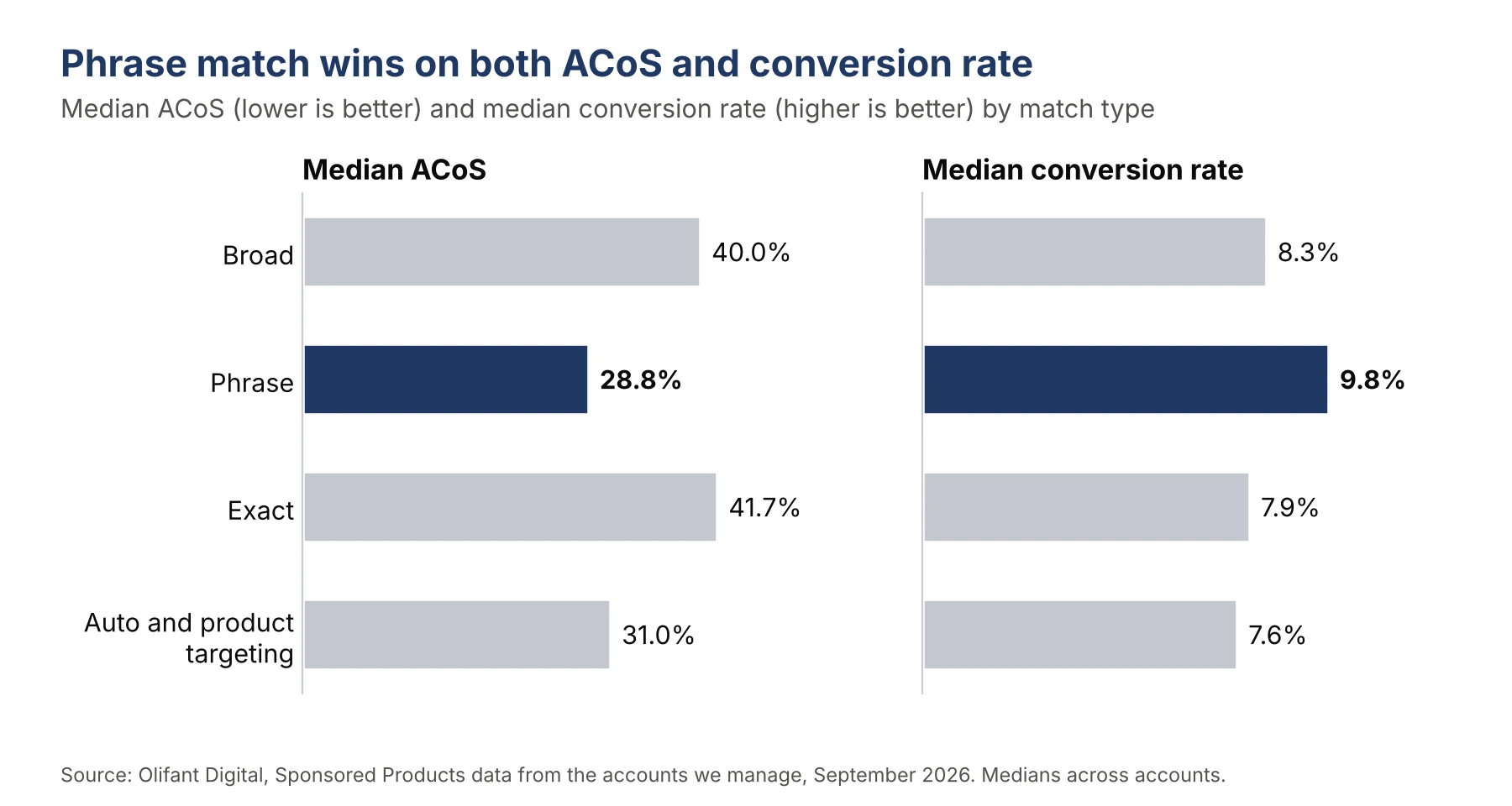
| Match type | Accounts (brands) | Median ACoS | Median conversion rate | Cost per click vs account average | Median cost per click, US dollar accounts |
|---|---|---|---|---|---|
| Broad | 46 (40) | 40.0% | 8.3% | 1.12 | $1.45 (n=34) |
| Phrase | 46 (35) | 28.8% | 9.8% | 1.11 | $1.10 (n=31) |
| Exact | 45 (36) | 41.7% | 7.9% | 1.16 | $1.17 (n=33) |
| Auto and product targeting | 62 (47) | 31.0% | 7.6% | 0.88 | $0.99 (n=41) |
This particular research comes from search term reports across 66 accounts from 47 brands, and the conversion rate here is the number of orders divided by the number of clicks.
Phrase match performs better on both ACoS and conversion rate, while broad and exact match types are both around 40%.
A median ACoS of around 40% can look high, so here is some context. Every figure in this study is a median across accounts, where a small account counts as much as a large one. Pooled across all US spend in September ($671,757), ACoS was 21.0%, because larger accounts run more efficiently, as our Amazon ads benchmarks show.
You will also notice that all three keyword match types cost more per click than the account average, and this happens because auto targeting gets much cheaper clicks (0.64 to 0.92 of the account average, as the auto targeting table further down shows), which pulls the average down for everything else.
Click-through rate, on the other hand, barely changes from one match type to the next. In the targeting report, the median click-through rate for broad, phrase and exact was between 0.73% and 0.77% (44 to 45 accounts).
What this data tells us is that the match type you choose changes how much a click costs you and how often that click turns into an order; however, the result doesn’t really change how often people click on your ad in the first place.
Why does exact match look so expensive?
The short answer is that it comes down to what brands put into it. What you see is a selection effect, not proof that exact match performs worse on its own.
Most brands move their most important keywords to exact match, and we do the same in our accounts.
Those keywords tend to be short and high-volume head terms like “coffee mug” or “yoga mat,” where pretty much every competitor in the category is bidding. Phrase match, by contrast, ends up catching mostly longer searches where there are fewer people bidding.
This is clear in the data, and we split each match type's spend by the number of words in the search term.
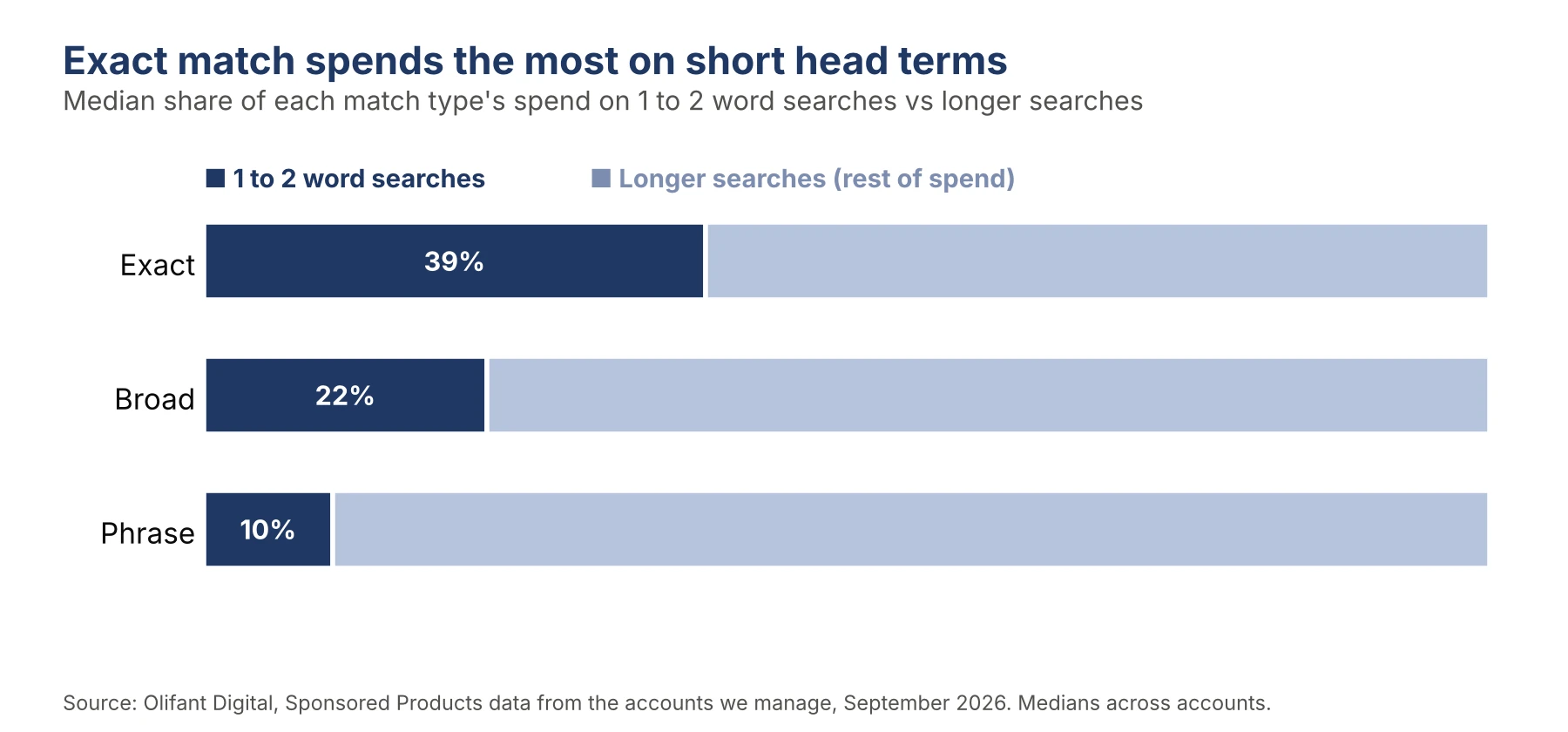
| Match type | Accounts | Median share of spend on 1 to 2 word searches |
|---|---|---|
| Exact | 45 | 39% |
| Broad | 46 | 22% |
| Phrase | 46 | 10% |
Exact match spends about four times as much of its budget on short head terms as phrase match does. Short terms are usually converting less while costing more per click.
You can think of it like this. When you compare exact and phrase head-to-head, you are partly comparing a shopper who typed “coffee mug” with a shopper who typed “large insulated coffee mug with lid.”
The second shopper knows what they want, and far fewer brands are bidding to reach them. Our study of Amazon ad benchmarks found the same pattern when we looked at search term length.
Does exact match lose inside the same account?
To remove any brand differences from consideration, we compared match types within the same account, and for each pair below, we used only accounts that had at least 100 clicks on both match types.
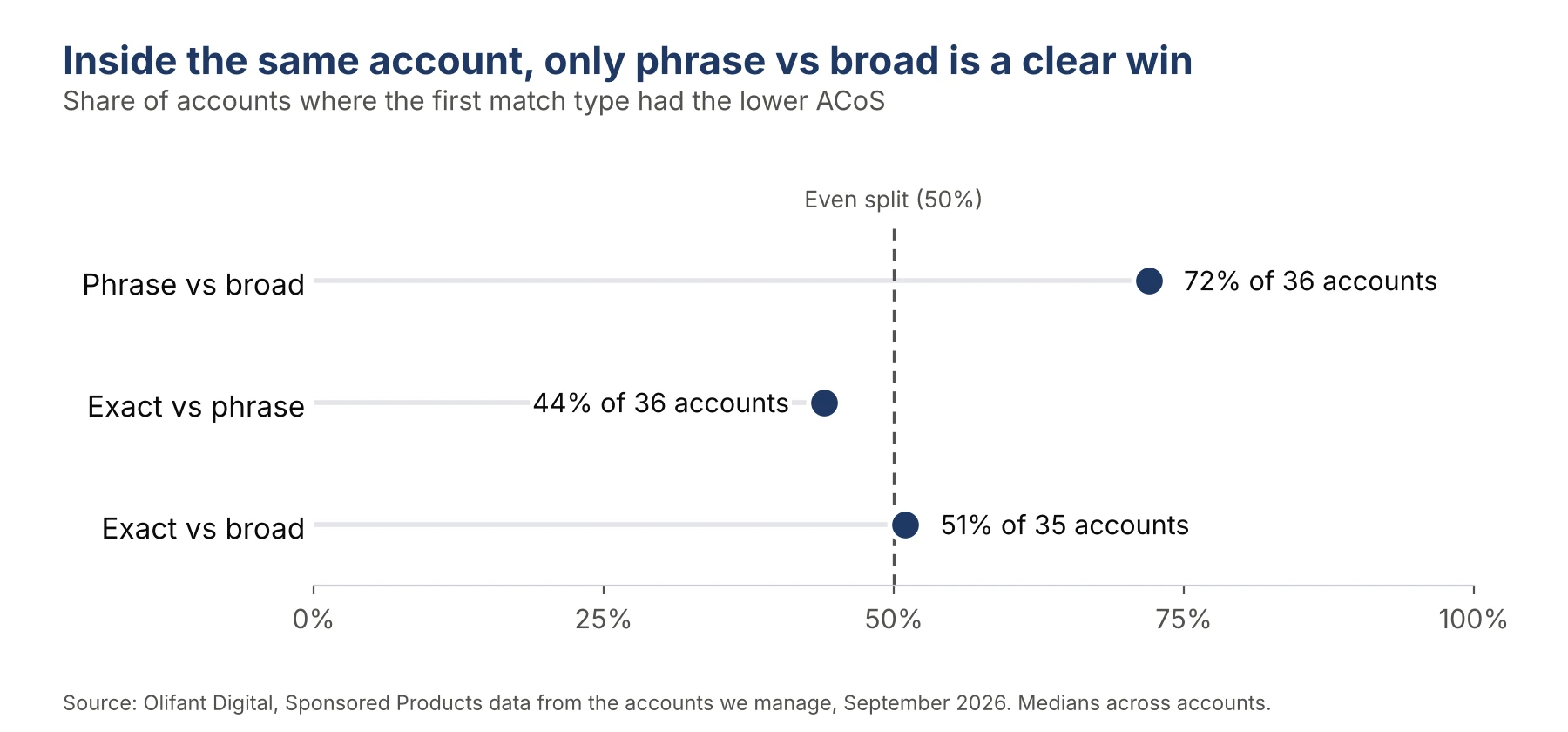
| Pair (same account) | Accounts | Median ACoS | First type had lower ACoS in | First type’s conversion rate vs second |
|---|---|---|---|---|
| Phrase vs broad | 36 | 29.0% vs 40.0% | 72% of accounts | 24% higher |
| Exact vs phrase | 36 | 40.5% vs 29.0% | 44% of accounts | about equal (1% higher) |
| Exact vs broad | 35 | 40.5% vs 39.8% | 51% of accounts | 8% higher |
The first thing that stands out is that phrase match really beats broad match. And this is not a one-off result because phrase had a lower ACoS in almost three out of every four accounts that ran both.
The second thing is that exact and phrase are much closer than the headline numbers suggest. When both ran in the same account, exact match converted about as well as phrase match, while exact had a lower ACoS in 44% of those accounts.
Exact vs broad is basically a coin flip, because exact had the lower ACoS in 51% of the accounts, so neither one is clearly better.
Likewise, we also had 30 accounts (from 28 brands) that ran all three match types with enough clicks to make a comparison. In those accounts, phrase had the best ACoS in 13, exact in 11, and broad only in 6.
Then we went one step further. Sometimes the very same search, for example, “yoga mat for beginners,” gets picked up by two different match types in one account. We looked at those cases, as long as the search got at least 10 clicks through each match type.
This covers 17 to 18 accounts, with a median of 6 to 9 shared searches per account. When the search was the same, exact converted about as well as phrase (a ratio of 0.99) and cost about 4% less per click.
Against broad, though, exact often ended up with a higher ACoS on the same search (31.6% vs 24.1% across 18 accounts). The likely reason is that brands bid higher on their exact keywords because they want their ad to show at the top of the search results, and those higher bids push the cost up.
If you want to see how those bids stack on top of each other, our post on Amazon placement modifiers and bid rules goes through it.
How much budget goes to each match type?
In the 30 accounts that ran all three keyword match types, this is the share of the Sponsored Products budget that the median account spent on each one.
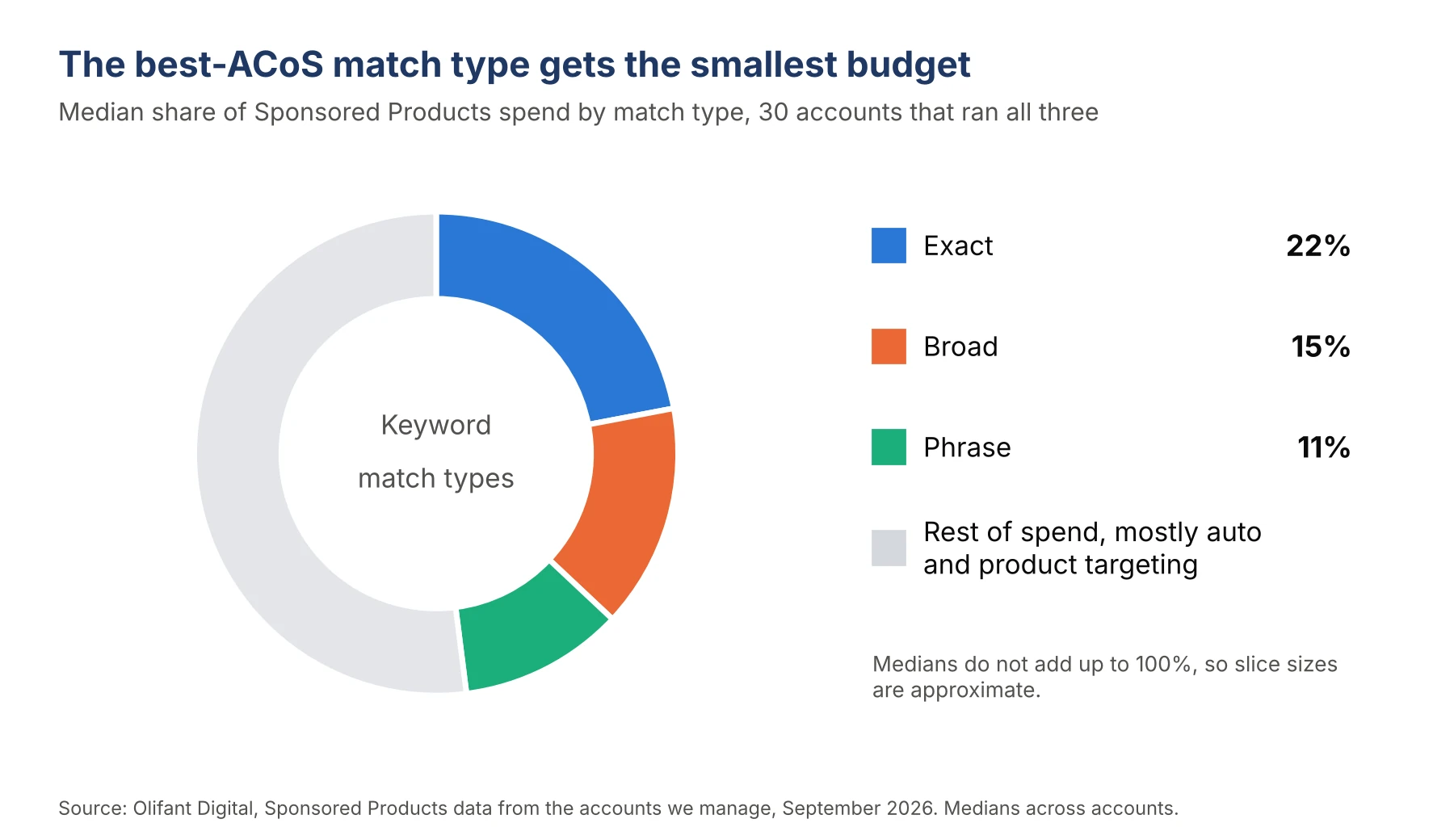
| Match type | Median share of Sponsored Products spend (30 accounts, 28 brands) |
|---|---|
| Exact | 22% |
| Broad | 15% |
| Phrase | 11% |
You need to keep in mind that medians do not add up to 100%, and the rest of the budget goes to auto and product targeting. Across all 66 accounts, auto and product targeting took a median 41% of spend.
This means that in most accounts, the match type with the best ACoS gets the smallest budget. Part of that is by design, as phrase traffic is limited by the number of long-tail searches that actually exist for your products, and you can’t buy more than what shoppers enter.
Still, it is worth seeing what it looks like in your account. Our guide to allocating an Amazon PPC budget takes you through how to shift spend step by step.
How do auto targeting groups compare?
Auto campaigns are made up of four targeting groups.
In the table below, we put them next to the keyword match types and product targeting (where you choose the specific product pages your ad shows on) and we used the targeting report for 65 accounts from 46 brands and the same 100-click threshold.
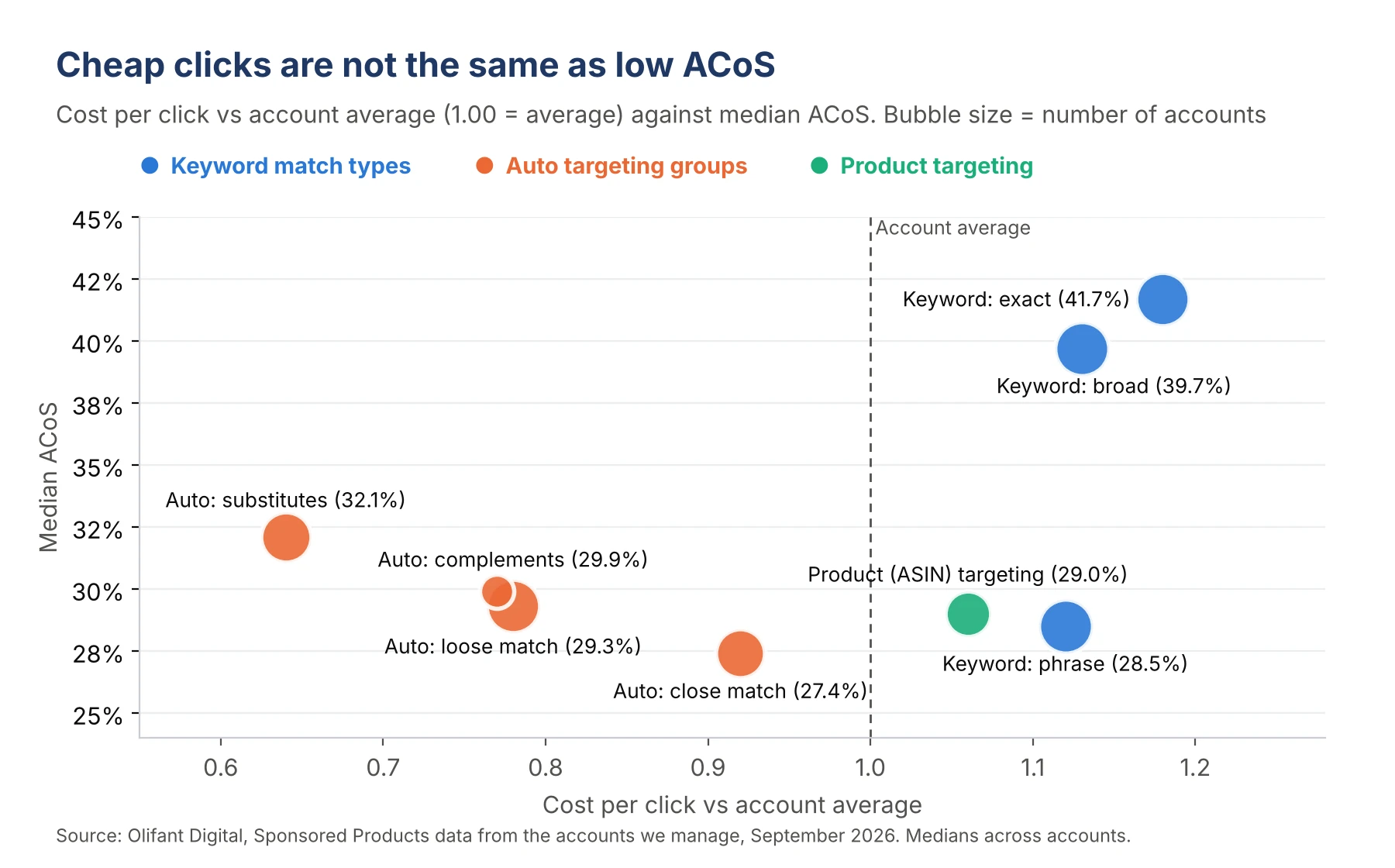
| Targeting | Accounts | Median ACoS | Conversion rate | Cost per click vs account average |
|---|---|---|---|---|
| Auto: close match | 37 | 27.4% | 8.1% | 0.92 |
| Auto: loose match | 44 | 29.3% | 6.4% | 0.78 |
| Auto: substitutes | 39 | 32.1% | 3.5% | 0.64 |
| Auto: complements | 18 | 29.9% | 4.1% | 0.77 |
| Product (ASIN) targeting | 32 | 29.0% | 11.8% | 1.06 |
| Keyword: phrase | 45 | 28.5% | 10.0% | 1.12 |
| Keyword: broad | 45 | 39.7% | 8.4% | 1.13 |
| Keyword: exact | 44 | 41.7% | 8.3% | 1.18 |
Close match converts about as well as broad and exact keywords do, and its clicks cost clearly less.
Substitutes and complements, in contrast, behave quite differently. They get cheap clicks that rarely turn into orders, and the only reason their ACoS remains acceptable is because those clicks cost so little. Complements also got 100 clicks in only 18 accounts, and its median share of spend was under 1%.
Product targeting is also worth a second look, since it had the highest conversion rate in the whole table at 11.8% even though its clicks cost a bit more than the account average. This row covers ASIN targets only. Our auto vs manual campaigns study groups ASIN and category targets together, where the median conversion rate was 12.9%.
Auto campaigns are the best place to find new keywords, because they show you what shoppers search for before you put money behind those terms in manual campaigns. Our guide to Amazon keyword harvesting explains how we do it. Our guide to Amazon auto campaigns covers how to set them up and how much budget to give them.
What this means for your brand
First of all, don’t judge exact match by its ACoS alone. Exact match carries your most competitive head terms, so the fair comparison is the same search terms in other match types and not your account as a whole.
You need to give phrase match more room. It had the lowest ACoS and beat broad in 72% of the accounts that we compared, so if your phrase campaigns keep running out of budget while they are still hitting your target, this is the first place where we would add spend.
You need to use broad for discovery and then tighten it.
In the same accounts, phrase converted 24% better than broad, so broad works best as a way to find new search terms instead of the place where most of your budget lives. Harvest the search terms that win, and move them into phrase or exact, and then add negative keywords for the waste.
It is also a good idea to check your exact bids. If an exact keyword costs you more than the same term does in broad or phrase, then your bid or top-of-search modifier may be set too high. Our guide on how to lower ACoS covers the other steps.
You should keep auto close match running. It delivered broad-like conversions at a cost per click that was about 8% lower than the account average.
Finally, you need to set up your campaigns in a way that lets you see all of these results. You can only make these comparisons if your campaigns keep match types cleanly separated.
Our Amazon PPC campaign structure post explains the 1-1-1-1 method that we use for that, and this article adds the match type data that the post doesn’t cover.
How we collected this data
All of the data comes from search term reports for Amazon Ads Sponsored Products and targeting reports for the accounts Olifant Digital manages, and we only used read-only report data.
The period is September 1 to 30, 2026, and because it covers one month, some seasonal effects are possible.
The sample is 66 advertising accounts from 47 brands. Some brands have multiple regional accounts (e.g., one for the US, one for the UK, and one for the EU), so the number of accounts exceeds the number of brands. The targeting report covered 65 accounts from 46 brands.
The accounts sell in the US, UK, Germany, France, Italy, Spain, Sweden, Belgium, Canada, Mexico and Australia.
We only included a match type or targeting group in an account’s results if it got at least 100 clicks during the month. Not every account reached that number for every match type, so each row in the tables is based on a different number of accounts.
Every figure is the median across accounts, so one very large account cannot pull the result up or down on its own. ACoS and conversion rate are ratios, so the currency doesn’t matter for them.
Cost per click is shown as an index against each account’s own average, and the dollar cost per click figures only use accounts that sell in US dollars. Sales and orders use Amazon’s 7-day attribution window.
The analysis is also not a controlled test. Brands choose which keywords go into which match type, so the all-account numbers include a selection effect.
The same-account and same-term comparisons reduce that effect, but they don’t remove it, and the same-term view only covers 17 to 18 accounts. ACoS also doesn’t take organic lift or profit margin into account, and Sponsored Brands and Sponsored Display are not included here.
You can find more of our data studies on our research page.
Frequently asked questions
Which Amazon match type has the lowest ACoS?
In our data, phrase match had the lowest ACoS, and its median was 28.8% across 46 accounts in September 2026, while broad came in at 40.0% and exact at 41.7%. Phrase also held up when we compared it with broad inside the same account, where it came out ahead in 72% of the cases.
Is exact match better than broad match on Amazon?
Not if you only look at ACoS. Inside the same account, exact had the lower ACoS in 51% of 35 accounts, which is relatively close to a coin flip. Exact did convert about 8% better than broad; however, it usually cost more per click.
Why is my exact match ACoS so high?
Most likely, your exact campaigns are targeting short, competitive head terms. In our accounts, 39% of the exact match spend went to one or two word searches, in comparison with 10% for phrase. Higher bids or top-of-search modifiers on exact keywords will push the cost up even more.
Should I use broad match on Amazon at all?
Yes, use broad match to find new search terms that you can later move to phrase or exact. Broad had a 40.0% median ACoS, and phrase converted 24% better than broad in the same accounts. So it helps to keep your negatives and bids tight.
Is auto targeting worth running next to manual keywords?
Yes, especially close match. Close match had a 27.4% median ACoS across 37 accounts, with a cost per click about 8% below the account average. Substitutes converted only 3.5% of clicks, so that is the group you should monitor closely.
Build your match type mix on your own data
The numbers in this study show what happens across many accounts, but your own account will have its mix of short, competitive searches and longer, more specific ones. This mix decides how much budget each match type should get.
If you are curious whether your current split is costing you sales, you can ask for a free marketing plan from Olifant Digital, and our team will look at how your match types are set up and where your keyword budget could work harder. You can also read how our Amazon PPC management works.

Alex is the founder and CEO of Olifant Digital, where his team manages over $100M in annual client revenue across 50+ brands on Amazon and ecommerce. He sets the agency's strategy and methodology, audits client accounts, and reviews the team's work to make sure every brand is on track to hit its growth and profitability goals. He also leads team training, so the performance data and lessons from across all accounts shape how every account manager runs their clients.



Mike reviews every Amazon article on this blog for strategic and technical accuracy before it publishes. As Director of Amazon Growth at Olifant Digital, he sets marketing strategy across client accounts and personally audits PPC at every stage of growth. He brings 8 years of daily Amazon operations across 7 and 8-figure brands including Beauty by Earth, Ekster, and Bullstrap, the kind of hands-on depth most agency directors delegate away.