

Stop guessing. Start ranking
with the right keywords

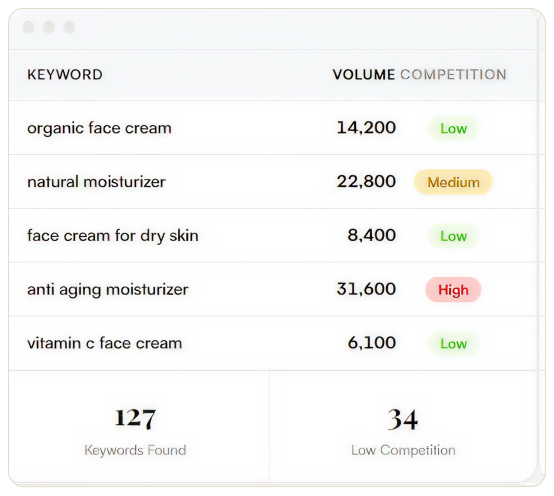
Find high-volume, low-competition keywords
Target high-volume, low-competition, relevant keywords in your Amazon listings and PPC campaigns, so you rank where your competitors don't.Reverse-engineer competitor ASINs
See exactly which keywords your competitors' products rank for, and steal the best ones for your listings.Get PPC bid estimates before you spend a dollar
Budget accurately to avoid overpaying for keywords that won't convert, so your PPC remains profitable.Your Category Is Our Category
Health, beauty, supplements, electronics, home goods, pet, baby, outdoor, and dozens more. We've scaled brands across 40+ product niches.Export keyword lists instantly
Export your searched keywords and upload them directly into your Sponsored Products, listing backend, or Amazon SEO workflow. No reformatting needed.

100% Free

No Login Required

Built by Olifant Digital
Powerful keyword research made simple
If we somehow left something out, let us know in your marketing plan request.

Keyword discovery
Uncover high-traffic Amazon search terms your competitors are ranking for but you're missing.

Competition scores
See ranking difficulty and competition levels so you target keywords you can actually win.

PPC Bid estimates
Get estimated CPC for every specific keyword so you can plan your Amazon PPC budget with real data.
How It works
Simple keyword research process with instant data and fast export.
1
Enter a keyword or ASIN
Paste any Amazon keyword, product ASIN, or URL.
2
Get instant data
You get search volume, competition, PPC bids, and keyword groups in seconds.
3
Export your keywords
Copy or download your search results
and start optimizing.
and start optimizing.
How we compare
Why pay for complexity when free gets results?
Feature
Olifant Tool
Jungle Scout
Helium 10
Free to Use


Keyword Search Volume

Competition Scores
PPC Bid Estimates
No Account Required
Export to CSV
Price
$0
$49/mo
$39/mo
Perfect for
Free Amazon keyword tool build for everyone.

Amazon sellers
Find the most searched keywords to optimize your listings, rank higher, and get more sales.

PPC managers
Discover profitable keywords with real bid estimates to build your campaigns better and faster.

eCommerce brands
Research Amazon demand before launching your products or expanding to a new marketplace.

Agency marketers
Build keyword strategies for your clients without paying for another expensive tool subscription.
More free Amazon tools
Built by the same team that manages $100M+ in Amazon revenue.

ACOS calculator
Calculate your Total Advertising Cost of Sale to understand how ads impact your overall revenue, not just ad revenue.
Free

TACOS calculator
Amazon TACoS, or total advertising cost of sale, is a metric to measure ad spend relative to an Amazon seller’s total sales revenue, including ad sales and organic sales.
Free
How to do Amazon keyword research
the right way (step by step)
Finding keywords is easy. Finding the right keywords that drive sales is the hard part.
Here are the exact tactics we use when managing Amazon accounts for 7 and 8-figure
brands.
Here are the exact tactics we use when managing Amazon accounts for 7 and 8-figure
brands.
Finding keywords is easy. Finding the right keywords that drive sales is the hard part. Here are the exact tactics we use when managing Amazon accounts for 7 and 8-figure brands.
Tactic #1
Reverse-engineer your top competitors' keywords
Start by doing a reverse ASIN lookup of your 3-5 direct competitors (products that show up when you search your main keywords). Paste their ASINs into the tool to see every keyword they rank for organically and in paid search.
Look for keywords where competitors rank in the top 20 but you don't rank at all. These are your biggest gaps. Filter by search volume > 500 and competition score < 60 to find the sweet spot: high demand, winnable keywords.
Look for keywords where competitors rank in the top 20 but you don't rank at all. These are your biggest gaps. Filter by search volume > 500 and competition score < 60 to find the sweet spot: high demand, winnable keywords.

Pro Tip: Run 3-5 competitor ASINs separately and look for keywords that appear across multiple competitors. If three competitors all rank for the same keyword and you don't, that's a priority target.
Tactic #2
Separate keywords by search intent
Not all keywords are equal. A buyer searching "bluetooth headphones" is browsing. A buyer searching "sony wh-1000xm5 noise cancelling" is ready to buy. Group your keywords into three buckets:
Broad/Discovery: Category-level terms with high volume. Use these in your product title and broad match PPC campaigns for product visibility.
Specific/Consideration: Feature-based terms (e.g. "wireless headphones with mic for office"). Use them in your bullet points and phrase match campaigns.
Purchase-Intent: Brand names, model numbers, comparison terms. Use in exact match campaigns for highest conversion and click through rates.
Pro Tip: Your listing title should contain your top 2-3 broad keywords. Your bullet points should weave in the specific/consideration keywords. Backend keywords should catch everything else.
Tactic #3
Use PPC bid data to prioritize keywords
High search volume doesn't always mean high value. A keyword with 50,000 monthly searches but a $5.00 suggested bid might eat your margin. A keyword with 3,000 searches and a $0.80 bid might be far more profitable.
Sort all the keywords from the list by estimated PPC bid and calculate the potential cost per acquisition for each keyword group. If your product sells for $29 and your conversion rate is 10%, a keyword with a $3.00 bid means $30 to acquire one customer, which is unprofitable. A $0.80 bid means $8.00 CPA, which gives you room to scale.
Sort all the keywords from the list by estimated PPC bid and calculate the potential cost per acquisition for each keyword group. If your product sells for $29 and your conversion rate is 10%, a keyword with a $3.00 bid means $30 to acquire one customer, which is unprofitable. A $0.80 bid means $8.00 CPA, which gives you room to scale.
Pro Tip: Use this formula: Estimated CPA = PPC Bid ÷ Conversion Rate. If the CPA is higher than your profit margin per unit, deprioritize that keyword in paid campaigns and focus on ranking it organically instead.
Tactic #4
Build a keyword harvesting funnel for PPC
Don't dump all your keywords into one campaign. Build a 3-tier funnel:
Research Campaign (Broad/Auto): Start here. Let Amazon's algorithm discover search terms. Low bids, wide net.
Refinement Campaign (Phrase Match): Move converting search terms from the research campaign here. Medium bids, tighter targeting.
Performance Campaign (Exact Match): Your proven winners go here. Higher bids, maximum control. This is where profit lives.
Every week, review search term reports from your broad/auto campaigns. Promote winners to phrase and exact match. Negate losers. This compounding discipline is what separates profitable accounts from money pits.
Pro Tip: We run this exact harvesting cycle weekly for every brand we manage. Over 3-6 months, the compounding effect of disciplined weekly negation typically reduces wasted spend by 25-40%.
Tactic #5
Optimize your listing for your top keywords
Once you have your final keyword list, place them strategically across your listing:
Title (most weight): Top 2-3 highest-volume keywords, front-loaded. Amazon indexes the first 80 characters most heavily.
Bullet Points: Weave in 15-25 mid-volume keywords naturally. Focus on benefits, not keyword stuffing.
Backend Search Terms: 250 bytes maximum. Use remaining keywords, synonyms, alternate spellings, and translations. No commas needed, just spaces.
A+ Content: Not indexed for search (text in images), but improves conversion rate which indirectly boosts organic rank.
Pro Tip: Amazon only indexes each keyword once. If "wireless headphones" is in your title, you don't need it in backend search terms. Use that space for keywords that aren't anywhere else in your listing.
Frequently asked questions
Is this tool really free?

Yes, completely free. No login, no account, and no credit card required. Just paste a keyword, ASIN, or Amazon URL and get your results instantly.
Where does the keyword data come from?
The tool pulls Amazon search and marketplace data to estimate volume, competition, and PPC bids for the keyword, ASIN, or URL you enter. It's built by the same team that manages Amazon PPC and SEO for 50+ active brands, so the data reflects what actually drives rankings and conversions on Amazon, not generic search trends.
How accurate are the search volume estimates?
These are estimates, not exact Amazon numbers. Amazon doesn't publish official search volume data to any third-party tool, including paid ones like Helium 10 or Jungle Scout. Treat the numbers as directional: reliable for comparing keywords against each other and spotting relative demand, not as an exact count of monthly searches.
Can I use this for Amazon PPC campaigns?
Yes. Every keyword comes with an estimated PPC bid so you can budget your Sponsored Products campaigns before you spend a dollar. Sort by bid to prioritize keywords with the best potential cost-per-acquisition, and use the search volume and competition scores to decide which keywords to target in broad, phrase, or exact match.
Which Amazon marketplaces are supported?
The tool currently supports the US Amazon marketplace.
How is this different from Helium 10 or Jungle Scout?
The core research (search volume, competition scores, PPC bid estimates, keyword export) is comparable, but this tool is free with no account required, while Helium 10 and Jungle Scout charge $39-49/month and require sign-up. It's built for sellers who want a quick keyword check without committing to a subscription.
Is there a limit on how many searches I can do?
No limit. Search as many keywords, ASINs, or URLs as you need, whenever you need.
Can I export my keyword results?
Yes. Once you run a search, you can copy or export your keyword results to CSV and upload them directly into your Sponsored Products campaigns, listing backend, or Amazon SEO workflow. No reformatting needed.
Certified full-service Amazon agency for brands that want to dominate
Work with us, we care about your results more than anyone in our industry. Clients work with us for years, and most likely, if you partner with us, you will too.