To get reviews on Amazon, ask every buyer through Amazon's Request a Review button 5 to 30 days after delivery (confirm the current window in Seller Central), enroll new products with fewer than 30 reviews in Amazon Vine, and add a neutral product insert. Sell a product that matches its listing, and never offer incentives or ask for positive reviews. Everything below is the full method, step by step.
Reviews help your product appear in more searches, increase your conversion rates, and build trust with wary consumers. They also help you compete in a marketplace where, according to Marketplace Pulse, about 1.65 million sellers were active at the end of 2025.
While it's easy to see why reviews are important, many organizations struggle to get enough of them to grow sales. We'll cover the strategies you can use to start turning things around.
Do reviews matter?
Yes. Reviews, both on Amazon and off, matter a lot.
Broadly speaking, they communicate trust, increase brand visibility, and increase sales.
BrightLocal's 2026 survey of 1,002 US consumers found 97% read reviews before choosing a local business. It also found 77% are put off by negative reviews and 68% will only use a business rated 4 stars or higher. Treat your star rating as the same filter on Amazon.
Why do I need Amazon customer reviews?
Unsurprisingly, the same logic that applies to reviews in general extends to your Amazon accounts.
Here are a few examples of customer reviews help Amazon sellers:
- They build trust with consumers. Reviews are one of the fastest ways to let shoppers know that your product lives up to its promise. In the same BrightLocal survey, 49% of consumers said they trust reviews as much as personal recommendations.
- They increase sales. A study of retail sites by Northwestern's Spiegel Research Center found that a product with 5 reviews is 270% more likely to be purchased than one with none. Which makes sense: how often do you choose the product with 4 reviews over a competing product with 300? Amazon sellers with more reviews and a higher average rating generate more conversions. A 2020 study conducted by Pattern found, in its own data, conversion rates went up about 12% as star ratings moved from 3 to 5.
- They make your products ready to advertise, and we treat ads and Amazon SEO as one plan. Amazon recommends advertising products with 5 or more reviews and 3.5+ stars, per its Amazon Ads guide.
- They help you understand your customers. Finally, reviews are a valuable source of customer feedback. They provide direct insight into what customers like (or don't like) about your products, allowing you to focus on making improvements where it matters.
What's a good sales-to-review rate on Amazon?
Amazon publishes no official review-rate benchmark. Calculate yours: reviews gained in the last 90 days ÷ units sold in the same period. Track it every month and watch the trend. If it falls, check your follow-up process, packaging and listing accuracy before anything else.
How many reviews do you need?
There is no single number. The bar is set by the products you compete with on your main keywords, so measure it instead of guessing:
- Search your 3 to 5 most important keywords and note the review counts and star ratings of the top 10 organic results.
- Find the lowest review count that still ranks on page one. That is your first target.
- Check those competitors again a month later to see how fast they add reviews. That is the pace you need to match.
The gap can be large. When our team researched an equine supplement category for a client, listings with fewer than 30 reviews sold under 10 units a month at $54 to $83, while listings with 100+ reviews in the same category sold 100 to 500 units a month. At that point review count, not price, was the main thing separating the sellers.
Amazon itself recommends having at least 5 reviews and a 3.5-star rating before you advertise a product, so the first handful of reviews matters most. Steady growth also looks more natural than a sudden spike.
How to get reviews on Amazon: 13 tips for capturing customer feedback
1. Get to know Amazon's review guidelines
Learn the rules before you ask for a single review, so you don't inadvertently violate Amazon policy.
Amazon knows that its customers take reviews really seriously. Shoppers rely on others' opinions to learn more about a product and find out if it's what they're looking for.
Amazon's community guidelines aim to ensure that reviews contain real, unbiased feedback from actual shoppers and prohibits the following.
As such, the following types of reviews are not allowed and will be taken down:
- Reviews written by people with a direct or indirect financial interest in your business (i.e. employees, investors, even the vendors who supply raw materials).
- Reviews written in exchange for a reward, including anything from cash payments and gift cards to free products and in-game credits.
- Reviews written by someone with a close relationship to the brand owner/creator (think friends and family).
- Multiple negative reviews from the same person for the same product.
- Leaving negative reviews on a competitor's product page.
- Swapping positive reviews with other merchants.
The risk now extends past Amazon. The Federal Trade Commission's Consumer Review Rule bans fake reviews and incentives tied to positive sentiment. Civil penalties are up to $53,088 per violation, as of December 2025. Amazon says it blocked over 275 million suspected fake reviews in 2024.
Amazon's policy is designed to minimize the number of reviews that mislead or manipulate shoppers. So, anything that stands to undermine consumer trust will be taken down.
Should Amazon find that you've been soliciting reviews in ways that violate the community guidelines, it could result in suspension or removal from the platform.
Our take: play by the rules. Getting booted from the platform could be a significant blow to your bottom line, with lasting effects you may never come back from.
2. Provide a great customer experience
The best way to get great reviews is to provide a great experience.
On Amazon, you don't have a ton of first-hand contact with customers so providing a great experience is more about doing the following:
- Avoiding outages and delays with proper inventory management.
- Responding to comments/questions in a timely manner.
- Making sure product pages, ads, and search queries align around a unified message.
- Ensuring that photos, specs, and copy accurately represent the product customers will receive.
3. Sell great products
Providing a great experience also means offering products that shoppers actually want to buy.
Per Amazon's e-commerce business guide, a great product should:
- Solve a pain point or challenge
- Improve an activity/function
- Address flaws common in competing products
- Capitalize on trends
You'll also want to validate your idea with real customers both through market research and individual interviews.
It also helps to understand why customers leave reviews in the first place. Jungle Scout's January 2021 survey of 1,005 US consumers found they leave reviews for the following reasons. Respondents could choose more than one answer, so the percentages don't add up to 100%.
Rank
Reason
Percent of Consumers
1
The product was excellent
56%
2
The product was unsatisfactory for reasons other than arriving broken
41%
3
I want to help other buyers understand the product's size or other relevant characteristics
38%
4
The product arrived broken
29%
4
I get an incentive for leaving a review
29%
6
The product was more expensive than I felt it was worth
22%
7
I had ideas about how to improve the product
20%
Excellent products drive the most reviews, but some of the other items on this list are telling.
Ideas about how to improve, a desire to help other shoppers understand a product's size/characteristics, and the product was more expensive than it was worth all point toward a shortcoming on the seller's end.
That means focusing on sourcing high-quality materials, building and improving products with customer feedback/market insights, and retiring the SKUs that don't resonate with shoppers.
4. Use Amazon's automated follow-up system
It's important to reach out soon after the customer receives the order when the experience is still fresh in their mind.
At the same time, you don't want to jump the gun and follow up the second you receive delivery confirmation.
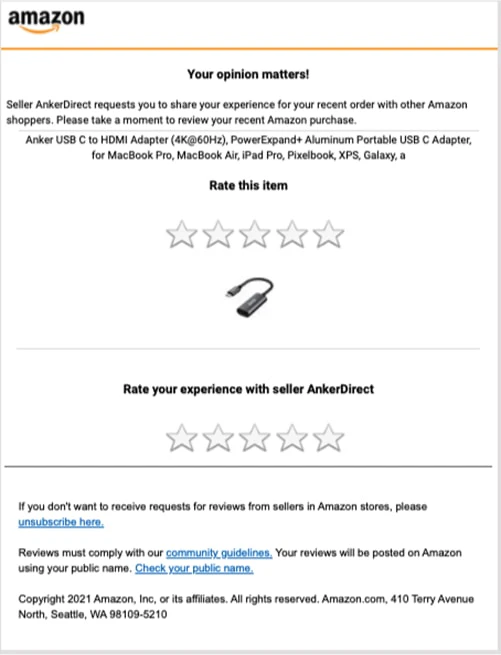
Instead, rely on Amazon's automated follow-up system. Amazon's systems already request reviews from buyers automatically, according to Seller Central text quoted by Jungle Scout.
Recipients receive a generic (albeit straight-to-the-point) email that looks like this:
5. Follow up with Amazon's 'Request a Review' button
Amazon's "Request a Review" button allows you to follow up with a second review request if a customer doesn't respond to the automated message. You can find the feature inside your Seller Central dashboard under "Order Details."
You can only use the button once per order, and only for a limited time. Amazon allows 5 to 30 days after the item was delivered, so confirm the current window in Seller Central.
Still, this method isn't especially efficient. You can't automate a second round of follow-ups from Amazon, so there's the risk that you'll miss out on easy opportunities to score more reviews.
Instead, you may want to look into an autoresponder tool, which allows you to automate your follow-ups.
A few options:
- JungleScout
- FeedbackFive
- Feedback Whiz
- AMZFinder
6. Enroll in one of Amazon's promotional programs
Amazon stopped new Early Reviewer Program enrollments on March 10, 2021 and ended the program on April 25, 2021, according to Kaspien. By early 2020 it had already added one-tap star ratings, a change reported to be an attempt at burying fake reviews.
One-tap ratings let shoppers leave a star rating and skip the written review. Since then, the number of reviews per product has increased dramatically, with many top 100 listings showing over 10,000 reviews.
Global review sharing essentially just means you'll see reviews from other countries, if you're part of the Amazon Global Selling program, that is.
If you're looking for a more active way to get more action on the platform, here a few options that might help:
- Amazon Vine sends free units to vetted reviewers.
- According to Amazon, you need a Professional selling account, a brand enrolled in Amazon Brand Registry (or generic products), and eligible FBA offers.
- The product needs fewer than 30 reviews, and you can offer up to 30 units.
- Fees per parent product are $0 for up to 2 units, $75 for 3 to 10, and $200 for 11 to 30.
- You pay nothing if no Vine review arrives within 90 days.
- Enroll every new parent ASIN on day 1, because reviews at launch drive conversion before ads scale.
- Launch coupon. A coupon is open to every shopper and isn't tied to leaving a review, so it is allowed. On launches we often run one for the first 6 to 8 weeks to win early sales, then reduce it once the product reaches about 20 reviews and converts on its own.
- Subscription Boxes. Amazon subscription boxes put new products in front of shoppers who expect to try them. Sellers are on the hook for assembling and packaging the boxes themselves, since FBA won't do it.
- Amazon Custom is a store on Amazon for products shoppers can customize with images, logos, or text. These products are also cross-posted to the main Amazon website and the appropriate categories/sub-categories. That presents additional opportunities to reach more people and provide a personalized experience. A lot of what you'll find here is personalized pet accessories like ID tags and bowls, wedding stuff, and gifts.
Note: Amazon FBA is currently not available for customized products. If you're an FBA user, it's worth considering whether it makes sense to keep some extra inventory on-site so that customization is an option.
7. Use product inserts
Another way to encourage customers to share feedback is by including product inserts in your shipments. Product inserts typically include the following information:
- Company contact details
- A request for feedback (often, this includes a QR code that directs customers to the appropriate page)
- Product instructions
Packaging inserts have low response rates. But, they do help contribute to overall brand awareness and they can enhance the brand experience.
Here, it might be worth investing in some professional design. Your goal is to capture customers' attention, something that's admittedly hard to pull off with a promotional piece of cardstock.
Make sure you avoid asking customers to "leave a 5-star review" or offer an incentive in exchange for leaving feedback. You might instead try something short and sweet like this thank you message below:

8. Stay on top of your reviews
Monitoring customer sentiment is a core part of your review strategy. Treat reviews, good or bad, as a two-way dialog with your customers.
Your goal is to be receptive and show reviewers that:
A: you're listening and
B: you'll use that feedback to do better in the future
Carve out some space in your schedule to monitor incoming reviews and be sure to respond ASAP. You don't want to let negative feedback fester. There's a real risk that the customer will get frustrated and air their grievances on other channels.
In other words, a customer who feels ignored might tweet about their experience in retaliation and amplify that complaint.
Beyond the damage control aspect, quick responses to negative feedback may actually increase shopper intent.
Most customers understand that things sometimes go wrong, and a thoughtful, fast response shows you're active and invested in the customer experience. New visitors will also see how you respond to negative feedback. Even with some negative reviews here and there, they're likely to walk away with a favorable impression of your brand.
Now, you'll have a few different options for managing reviews.
Inside Amazon Seller Central. Amazon's Customer Reviews tool lets brands track reviews and respond to customer concerns. Access requires a Professional selling account and a Brand Representative role for a brand enrolled in Amazon Brand Registry.
You can:
- Track product reviews from the last 12 months
- See low ratings as they come in
- Report reviews that break Amazon's community guidelines
When a buyer leaves a low rating, read what went wrong and fix the cause. Amazon has changed the options for contacting reviewers over time, so use only what your Customer Reviews dashboard offers, and never ask a buyer to change or remove a review.
We recommend checking the tool daily, because a fast fix is the only legitimate way to change the outcome. You can't edit or remove reviews.
Do note, this option is only available to sellers who own their brand. Meaning, it's not available to merchants that sell other brands' products, whether they're drop shipping or handling inventory themselves.
Social listening/reputation management tools
For sellers who are managing multiple channels, it makes more sense to use a social listening tool to keep a pulse on the customer conversation rather than relying on the Amazon dashboard alone.
Here are some top-rated options that integrate with Amazon:
9. Use PPC and paid social to feed your customer review strategy
More sales mean more people will leave reviews and the more reviews you have on your listings, the more sales you'll generate.
Once you've got an established presence on Amazon, reviews will start to generate sales on their own. That said, it's hard to establish that momentum if you're new to the platform or are launching new products.
That's where advertising comes in.
No matter how great your products are, sometimes you need to take matters into your own hands and point shoppers in the right direction.
Amazon Ads: best for active Amazon shoppers
The most obvious choice here is using Amazon Ads to promote Amazon listings.
Sponsored product ads work best in cases where you're trying to reach shoppers who are already on the platform. Sponsored products are about making sure your product is in the "right place at the right time" so active users can discover them.
Make sure you use the targeting options to get in front of the right shoppers.
Amazon Ads can't do much for you outside the platform, so you'll want to use paid social to bring in some external traffic.
Social media ads: best for reaching inactive customers in your target market
Jungle Scout's Q1 2024 consumer survey found 56% of US shoppers start product searches on Amazon, which leaves the rest of your audience reachable off-platform.
What's great about using a channel like Facebook, you can reach users who aren't actively shopping on Amazon or searching for specific items on Google.
While the passive nature of social scrolling means you have to work harder to capture users' attention, you can use detailed audience targeting:
- Demographics: location, income, age
- Lookalikes: people that share characteristics with your existing customers
- Interests: Hobbies, music, TV, movies, books, etc.
Additionally, Facebook allows you to capture way more customer feedback than Amazon. You can create lead-gen forms that capture email addresses or ask them to opt in to Messenger communications.
If you're trying to bring shoppers to Amazon, you'll want to use a landing page, as Facebook users will have much lower buying intent than their counterparts on Amazon.
Embed a link to an Amazon landing page where you can collect contact details and showcase your products.
You can also run A/B tests on copy, images, and ad types and learn how ads perform with different segments. All the data you collect can help you optimize your Amazon listings and refine your on-platform ads so you'll get better results.
10. Optimize Amazon listings for purchase intent
Here's a basic overview of how to optimize listings for Amazon so that users can find what they need. For the full process, see our Amazon listing optimization guide.
Amazon's search algorithm ranks products by likelihood of purchase (see how Amazon's A10 algorithm works). All searches are commercial, and likelihood of purchase is determined by the following factors:
- Text match: Using the keywords that reviewers include in their write-ups can increase your listing's text match relevancy. That can both improve your Amazon SEO performance and help you demonstrate that your product is exactly what shoppers are looking for. Mine your reviews and your competitors' reviews for repeated objections, then answer them in your bullets. We build listing copy this way, so bullets address the objections buyers raise before they buy.
- Price: Is your price competitive?
- Availability: Do you have products in stock?
- Prime status: Are you Prime eligible?
- Ratings & reviews: What's your average rating? How many reviews do you have?
- Images & video: Do images/videos match the copy, provide a clear picture of the product?
11. Create a mailing list and ask customers for reviews
The people who subscribe to your newsletter probably like something about your brand and there's a good chance they've purchased from you in the past, making them a great source of positive reviews.
You can build an email list from Amazon, then send information about your product and a link to that specific listing.
Keep in mind, the response rate will likely be pretty low.
Ask every subscriber who bought the same way, with neutral wording. Asking only happy customers, or asking for a positive review, breaks Amazon's rules.
Our recommendation: use email responder tools that include features like dynamic personalization and automated sequencing. ActiveCampaign, Campaign Monitor, and MailChimp are a few that come to mind. This will save you a ton of time and get better results than manual, ad-hoc strategies.
Or, you might try using Messenger instead. The idea is the same: you're building a list of subscribers by obtaining active consent, though Messenger bots provide a more interactive experience.
12. Learn from competitor reviews
Your competitors' reviews are free research. Read the 1 to 3 star reviews on the top products for your keywords and note the complaints that keep coming up: sizing, durability, missing parts, taste, smell.
Then fix what you can in the product and answer the rest in your images and bullets. A shopper who sees their worry addressed up front is more likely to buy, and a buyer whose expectations were met is more likely to leave a good review.
Don't contact people who reviewed competitor products to ask them for reviews. Amazon doesn't share buyer contact details for that purpose, and unsolicited outreach tied to reviews can break its policies.
13. Check your seller feedback
While it's more common for customers to leave feedback on individual product pages, many people opt to share their thoughts in the Seller Feedback section on your profile.
You'll want to make a habit out of checking your Seller Feedback for a few reasons.
1. It's an opportunity to earn a second review. Seller Feedback often mentions a specific product. You can't ask only the happy customers to repeat it as a review, but you can make sure every buyer gets the same neutral review request.
2. It prevents critical feedback from falling through the cracks. Customer complaints, requests for a specific product, suggestions for making improvements can all help you improve your performance on the platform and win some repeat customers. If you're not paying attention, you might miss the important insights hiding out on your profile page.
3. It allows you to report negative product reviews. Bad product reviews don't belong on the seller page. If you find one in your Seller Feedback, you can reach out to Amazon and they'll take it down.
Amazon removes product reviews posted in Seller Feedback because they belong on the product page. For reviews on the product page itself, see how to remove policy-breaking reviews.
Amazon customer reviews: dos and don'ts
Do:
- Focus on the customer. Remember, positive reviews are the result of a positive experience. If you focus on creating products customers love, exceed expectations, and make an effort to stay fresh in their minds, chances are, you'll start to see more 5-star ratings.
- Develop a review generation strategy. Again, a lot of this comes down to consistency: following up on every order, responding to customer feedback in a timely manner, and establishing a recognizable presence on Amazon and off.
- Keep discounts to a minimum. Adding discount offers to your customer review requests can come off soliciting reviews.
- Use review feedback to improve. Look, it can be hard to receive negative feedback but it's important to take a step back and think of it as an opportunity to improve.
Don't:
- Buy reviews. It doesn't matter if you hire fake reviewers or offer your employees cash bonuses for sharing some kind words. Fake reviews manipulate customer perception.
- Offer incentives. Even if you're not buying reviews outright, incentivizing reviewers is against Amazon community guidelines.
- Ask friends and family to leave a 5-star review. Another example of soliciting reviews: getting your friends and family to
- Ask customers to change their review or take it down. Avoid asking customers to take down negative reviews. Your best bet is helping them solve the problem, which in many cases will prompt them to update the initial review on their own. Additionally, customers expect to see a handful of negative reviews and are likely to think that a seller with only 5-star ratings is gaming the system.
- Pick and choose reviews. Amazon doesn't allow sellers to "cherry pick" reviews. Meaning, you can't exclusively solicit reviews from people you already know had a positive experience with your brand while ignoring customers you believe had neutral or negative experiences.
- Use manipulative language. Make sure you ask for feedback in a neutral way. Don't ask customers to share "5-star reviews." Instead, ask them to share their feedback and make it easy for them to do so.
How to get reviews on Amazon: FAQs
Can I pay for Amazon reviews?
No. Amazon's community guidelines ban reviews written in exchange for cash, gift cards, free products, or any other reward. The FTC's Consumer Review Rule also bans fake reviews and incentives tied to positive sentiment. The FTC sets civil penalties of up to $53,088 per violation, as of December 2025.
How does the Request a Review button work?
Open the order in Seller Central and click Request a Review on the Order Details page. You can use it once per order, 5 to 30 days after delivery (confirm the current window in Seller Central). Amazon then sends the buyer a standardized message asking for a product review and seller feedback.
Is Amazon Vine worth it for a new product?
For a new parent ASIN with fewer than 30 reviews, yes. You also need a brand enrolled in Amazon Brand Registry (or generic products). Amazon charges $0 for up to 2 units, $75 for 3 to 10, and $200 for 11 to 30, per parent product. If no Vine review arrives within 90 days of enrollment, you aren't charged.
Are Amazon reviews reliable?
Amazon actively polices them. The company says it blocked over 275 million suspected fake reviews in 2024. For your brand, that means any manipulated review is a liability.
How many stars should I aim for?
Aim for an average between 4.0 and 4.7 stars. Northwestern's Spiegel Research Center found purchase likelihood typically peaks in that range, based on retail-site data first published in 2017. Shoppers also tend to distrust a seller with only 5-star ratings, so focus on review volume and fixing the issues low ratings raise.
How we handle reviews at Olifant
Reviews are part of our full Amazon account management, not a separate project. We manage $100M+ in annual Amazon client revenue across 50+ Amazon accounts, and the routine is the same on every account:
- Launch: Vine on day one for eligible products, a launch coupon for the first weeks, and ads scaled up as the first reviews arrive.
- Listing: recurring complaints from our own and competitors' reviews go into the images and bullets, so buyers know what they are getting.
- Monitoring: new low ratings are checked every week and passed to the brand when they point to a product or packaging issue.
Our services start from $2,000 per month and are custom for each project, based on the complexity and workload required. Every engagement is backed by our 60-day guarantee: if you're not happy in the first 60 days, we refund your management fees.
Final thoughts
The target outcome is straightforward: generate more reviews without violating Amazon's terms of service. Review generation comes down to a few key components: creating a great experience, asking for reviews, and using feedback to improve and nurture customer relationships.
At a certain point, your customers are in control of your brand's narrative. It's up to you to provide great service, high-quality products, and gently guide them toward sharing feedback about their experience.
Assuming you've done everything right, they should only have nice things to say. And if they don't? Apologize, make it right, and use any criticism you receive to improve.
Every engagement with us starts with a free marketing plan that includes a listing conversion audit and a prioritized growth roadmap. Get your free marketing plan.
Chapter 3 of the Amazon listing optimization guide
Conversion rate and reviews
- Amazon Conversion Rate: Benchmarks, Formula and 23 Ways to Improve It
- How to calculate Amazon conversion rate: Simple steps
- How To Delete An Amazon Review And Generate More Positive Reviews For Your Online Store
Related articles
.webp)
Alex is the founder and CEO of Olifant Digital, where his team manages over $100M in annual client revenue across 50+ e-commerce brands. He sets the agency's strategy and methodology, audits client accounts, and reviews the team's work to make sure every brand is on track to hit its growth and profitability goals. He also leads team training, so the performance data and lessons from across all accounts shape how every account manager runs their clients.


.png)
Mike reviews every Amazon article on this blog for strategic and technical accuracy before it publishes. As Director of Amazon Growth at Olifant Digital, he sets marketing strategy across client accounts and personally audits PPC at every stage of growth. He brings 8 years of daily Amazon operations across 7 and 8-figure brands including Beauty by Earth, Ekster, and Bullstrap, the kind of hands-on depth most agency directors delegate away.