


Introduction
Amazon's rankings reward sales velocity above all else. Cut ad spend too aggressively, and sales drop, triggering ranking declines that cost even more to recover.
That's why random bid cuts rarely work. This article lays out a complete, end-to-end system, from diagnosing ACOS spikes to reallocating spend intelligently, built for real competitive pressure.
Reducing Amazon ACOS without losing sales becomes manageable when every move follows a plan instead of guesswork.
How To Reduce Amazon ACOS Without Losing Sales: The Exact System Profitable Sellers Use
Amazon's rankings reward sales velocity above all else. Cut ad spend too aggressively, and sales drop, triggering ranking declines that cost even more to recover.
That's why random bid cuts rarely work. This article lays out a complete, end-to-end system, from diagnosing ACOS spikes to reallocating spend intelligently, built for real competitive pressure.
Reducing Amazon ACOS without losing sales becomes manageable when every move follows a plan instead of guesswork.
Lower Your Amazon ACOS: A 10-Step Framework That Protects Revenue
Reducing ACOS isn't about slashing ad spend and hoping for the best; it's about systematically optimizing every element of your advertising strategy while maintaining the sales velocity that keeps you ranked.
This proven framework helps sellers optimize their advertising performance over 8 weeks without sacrificing market position.
Here's exactly how to do it:
Step 1: Establish Your Baseline and Target ACOS (Week 1)
Before making any changes, you need to know where you stand and where you're going. Start by calculating your break-even ACOS to understand your profitability threshold.
Calculate your break-even point:
- Formula: (Product Price - COGS - Amazon Fees - Shipping) ÷ Product Price × 100
- Skip the manual math - use the ACoS Calculator to find your current ACoS instantly before setting your target.
- Example: ($50 - $15 - $7.50 - $2.50) ÷ $50 = 50% break-even ACOS
- Set your target ACOS 15-25% below break-even for sustainable profitability
- Pull 60-day campaign data from the Amazon Advertising console
- Document current ACOS across all active campaigns
- Calculate your TACoS (Total Advertising Cost of Sales) = Ad Spend ÷ Total Revenue
Pro Tip: TACoS tells you what percentage of your total revenue goes to ads, not just PPC sales. If your TACoS is below 10%, you have room to be more aggressive with PPC to capture market share.
Step 2: Conduct Deep Search Term Analysis (Week 1)
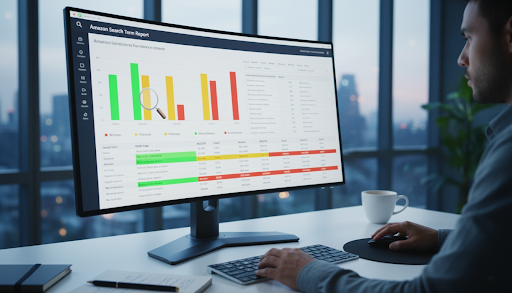
Your search term report reveals which keywords are actually making you money versus which ones are draining your budget. This analysis forms the foundation of your optimization strategy.
Segment your search terms into four categories:
- Winners: ACOS below target + 3+ orders (your profit drivers)
- Potential: ACOS slightly above target + 2+ orders (need optimization)
- Money Drainers: ACOS 2x+ above target with <2 orders (budget wasters)
- No Converters: Spend >$20 with 0 orders (immediate negatives)
Export your 60-day Search Term Report from Campaign Manager and sort by orders from highest to lowest. Analyze which search intent converts best: are customers finding you through problem-solving queries ("back pain relief pillow") or comparison shopping ("best memory foam pillow")? This insight determines your keyword strategy.
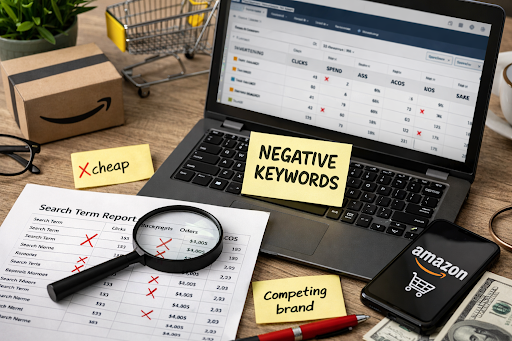
Step 3: Implement Strategic Negative Keywords (Week 1-2)
Negative keywords are the fastest way to stop hemorrhaging budget on non-converting traffic. This single action can deliver immediate ACOS improvement without touching your winning campaigns.
Add negatives in this priority order:
- No Converters: Any term with >$20 spent and 0 orders
- Wrong Intent: "cheap," "alternative to," wrong specifications
- High Spend/Low Performance: ACOS 3x+ target with <1% conversion rate
- Broad Match Bleeders: Irrelevant variants capturing your budget
Start with campaign-level negatives for the broadest impact. Use exact match negatives for specific poor performers and phrase match for term patterns. Never add negatives to terms with less than $10 spent; you don't have enough data yet.
Step 4: Restructure Campaigns by Performance Tier (Week 2)
Most sellers run campaigns with high-performers and low-performers mixed together, making optimization impossible. Separating them by performance unlocks better ACOS through intelligent budget allocation.
Create three distinct campaign types:
A) High-Performance Exact Match Campaigns
- Extract your "Winner" keywords from Step 2
- Use the Exact match type only for maximum control
- Set bids 20-30% higher than current (these convert)
- Allocate 40-50% of the total budget here
B) Testing Phrase Match Campaigns
- Move "Potential" keywords here to capture variations
- Set bids at current average levels
- Budget: 30-35% of total
- Monitor 2-3 weeks, then harvest winners to Exact campaigns
C) Discovery Broad Match Campaigns
- Keep for new keyword discovery only
- Lower bids by 30-40% from current levels
- Conservative budget: 15-20% of total
Example: If you're spending $100/day, allocate $45 to proven Exact match campaigns, $32 to Phrase testing, and $23 to Broad discovery. Your proven winners get the lion's share of the budget while maintaining discovery potential.
Step 5: Optimize Bids Based on Performance Data (Week 2-3)
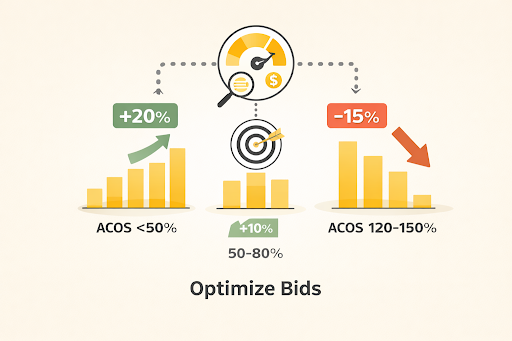
Data-driven bid adjustments are where you fine-tune profitability. Use this formula for any keyword with 10+ clicks to ensure statistical significance.
Bid adjustment framework:
- ACOS <50% of target: Increase bid by 20%
- ACOS 50-80% of target: Increase bid by 10%
- ACOS 80-120% of target: Keep bid same (monitor)
- ACOS 120-150% of target: Decrease bid by 15%
- ACOS 150-200% of target: Decrease bid by 25%
- ACOS 200%+: Decrease bid by 40% OR pause if >30 clicks with no sales
Keep in mind that your bid adjustment framework is based on your product price, cogs, margins.
Analyze your placement performance separately. If Top of Search ACOS runs 30%+ higher than other placements, reduce your placement adjustment from the default 50% down to 0-25%. If Product Pages perform well, test increasing to 75-100%.
Pro Tip: Use "Down Only" bidding strategy for campaigns near target ACOS; save "Fixed Bids" for high-ACOS campaigns needing strict control.
Step 6: Improve Listing Conversion Rate (Week 2-4)
Once your structure is clean, you can start optimizing bids based on math, not feelings. Use this framework for any keyword with at least 10 clicks to ensure statistical significance:
Priority optimization sequence:
Main Image (Highest Impact):
- Professional white background with product filling 80-85% of the frame
- Add lifestyle context if applicable to your category
- A/B test variations through split testing or manual rotation
Title Optimization:
- Follow this proven formula: Brand + Product Type – Primary Benefit | Supporting Features + What's Included, Size
- Example: BlueTech Wireless Earbuds – 40Hr Battery Life | Noise Cancelling, Waterproof IPX7, USB-C Charging, 6mm Drivers
- A brand name first establishes trust and trademark protection
- Stay within 200 characters for mobile display
Bullet Points:
- First 2 bullets: Primary benefits and use cases
- Bullets 3-4: Key features, dimensions, specifications
- Bullet 5: Guarantee, warranty, or unique selling point
A+ Content & Video:
- A+ Content can deliver significant conversion improvements when properly implemented
- Create a 30-60 second product demo showing the solution to the customer's pain point
- Position video at slot 2 or 3 in the main image carousel
- Video helps customers make more informed purchase decisions and increases engagement with your listing
Before launching any external campaigns, ensure your Amazon store is optimized for the highest conversion rate possible.
The beauty of listing optimization is that it compounds with your ad spend; better conversion rates mean the same advertising budget generates more sales, automatically lowering your ACOS without reducing visibility.
Step 7: Launch Product Targeting Campaigns (Week 3)
Product targeting campaigns often run at lower ACOS than keyword campaigns because you're targeting high-intent shoppers already viewing similar products.
Competitor ASIN Targeting approach:
- Identify 10-15 competitor products with a similar price point (±20%)
- Target products with a lower review count/rating than yours
- Create individual campaigns per competitor ASIN
- Bid conservatively: start 30% below keyword campaign bids
- Monitor performance against your keyword campaign benchmarks
For Category Targeting, target your specific category/subcategory with filters for price range, reviews, and Prime eligibility. Start bids 40% below keyword bids; this channel works for supplemental sales at optimized ACOS.
Step 8: Implement Dayparting Strategy (Week 3-4)

Not all hours are created equal. Some hours convert significantly better than others. Dayparting lets you capitalize on this pattern by adjusting bids based on time of day performance.
Implementation method:
- Export hourly performance data from a third-party tool or Amazon reports
- Increase bids 15-20% during peak hours (typically 10 am-9 pm in your target timezone)
- Decrease bids 25-35% during low-performing hours (typically midnight-6 am)
- Consider pausing campaigns entirely during the worst 4-6 hours if performance is drastically poor
This temporal optimization can deliver measurable ACOS improvements without changing anything else about your campaigns.
Step 9: Gradually Reduce Bids on High-ACOS Keywords (Week 4-6)
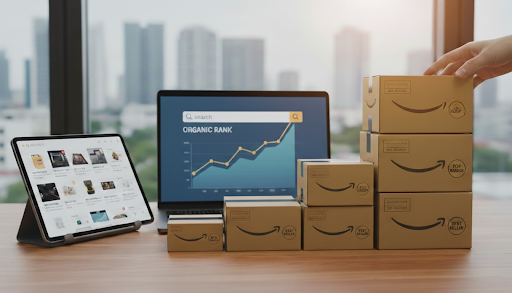
This is the most sensitive step. Aggressive bid cuts reduce sales velocity. If sales drop by more than 20%, Amazon will punish your organic ranking.
The safe method is a gradual reduction over three weeks. Never cut a bid by more than 25% in a single day.
- Week 4: Reduce bids by 15% on keywords with an ACOS 150-200% of target. Watch your sales velocity daily. If sales drop significantly, pause the reduction.
- Week 5: If sales held steady, reduce another 10%. If sales dropped, hold steady.
- Week 6: Final 10% reduction. If the keyword is still burning cash after three cuts, pause it and move that budget to a winner.
Step 10: Monitor and Maintain (Ongoing)
ACOS optimization isn't one-and-done; it requires consistent monitoring and adjustment as market conditions change.
Weekly tasks:
- Review Search Term Report and add negatives
- Adjust bids on keyword-level ACOS outliers
- Monitor sales velocity versus the previous week
- Adjust daily budgets if campaigns are capping early
Bi-weekly tasks:
- Harvest winning keywords from Phrase/Broad to Exact campaigns
- Review placement performance and adjust bids
- Analyze product targeting and add new competitors
Monthly tasks:
- Full campaign audit comparing ACOS, sales volume, and organic ranking
- Reallocate budget from underperformers to top performers
- Test new ad formats (Sponsored Brands, Sponsored Display)
Expected Timeline: Following this framework systematically allows you to optimize ACOS over 8 weeks while maintaining sales volume. The key is making changes gradually and monitoring results at each step.
All optimization strategies should be tested and monitored against your specific product performance. Market conditions, competition, and seasonality can affect results. Always maintain a balance between ACOS optimization and sales velocity to protect your organic ranking position.
ACOS Spike Emergency: Your 15-Minute Diagnostic Protocol
Woke up to a 30%, 50%, or 100% ACOS spike this week? Before panic-slashing bids, identify whether this is an advertising problem or external factors destroying your conversion rate. Many ACOS spikes have nothing to do with your PPC settings.
This 15-minute emergency diagnostic pinpoints the real culprit before you make changes that could worsen things.
Rapid Diagnostic Checklist (Check These First)
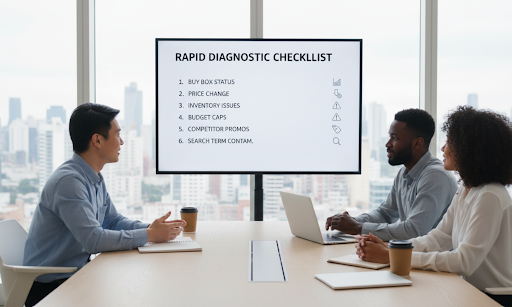
1. Buy Box Status Check (2 Minutes)
The Buy Box is responsible for 82% of Amazon's sales. When you lose it, PPC clicks land on your listing, but the 'Add to Cart' button directs customers to a competitor; you're paying for their conversions.
What to check:
- Open your listing in incognito: Is your company name in the Buy Box?
- Check Seller Central → Inventory → Manage Inventory → Buy Box percentage
Why this matters: Lost Buy Box means ad spend continues while conversions plummet. ACOS spikes, but it's not a campaign performance issue.
Quick fix: Review pricing, fulfillment method (FBA wins), and seller metrics. Regaining the Buy Box often fixes ACOS overnight.
2. Price Change Investigation (2 Minutes)
Even a $2 increase can cross psychological thresholds ($29.99 vs $32.00) and crater conversion rates.
What to check:
- Review pricing history: Seller Central → Pricing → Pricing Health
- Compare the current price to last week and the top 3 competitors
Why this matters: Price up 10% + conversion down 15% = ACOS spike with zero advertising changes. Same ad spend, fewer conversions = higher cost per sale.
3. Listing Suppression & Inventory Issues (3 Minutes)
Suppressed listings or low inventory warnings destroy trust and crater conversions while ads burn budget.
What to check:
- Seller Central → Inventory → Manage Inventory → yellow/red warnings
- Listing suppression notices (policy violations, image issues)
- Adequate inventory (under 30 units triggers CVR-killing warnings)
- Front-end shows "In Stock."
Why this matters: Suppressed listings may still show ads, but customers can't complete purchases. Low inventory warnings create anxiety. Both = ad spend with minimal sales.
4. Budget Caps & Early Spend Depletion (3 Minutes)
Campaigns hitting daily budget by noon means missing peak evening sales hours, while ACOS looks inflated from morning-only data.
What to check:
- Campaign Manager → which campaigns show "Budget" status
- Spending 80%+ of the budget before 3 pm?
- Missing your highest-converting evening hours?
Why this matters: Budget-capped campaigns stop during peak hours. You spent during a lower-conversion morning but missed evening buyers; ACOS looks worse than reality.
Quick fix: Increase daily budgets 30-50% temporarily to test if you're leaving money on the table.
5. Competitor Promotions & Deals (3 Minutes)
A competitor's lightning deal, coupon, or promotion steals traffic and conversions silently.
What to check:
- Search main keywords: competitors with "Deal" badges, coupons, Prime discounts
- Price drops of 15%+ this week
- New 5-star reviews (indicates velocity surge)
Why this matters: Your ads generate clicks, but customers compare and buy the discounted competitor instead. You're paying for traffic that's not converting.
Quick fix: Run your own promotion, improve value proposition in bullets/images, or increase branded keyword bids defensively.
6. Search Term Report Contamination (2 Minutes)
A single irrelevant high-spend search term can spike ACOS overnight in Broad match campaigns.
What to check:
- Download 7-day Search Term Report
- Sort by "Spend" (highest to lowest)
- Any terms with $50+ spend and 0 orders?
Why this matters: One rogue term capturing $200 with zero sales inflates weekly ACOS by 10-20 percentage points; everything looks broken when it's just one keyword bleeding budget.
Quick fix: Add as a negative keyword immediately.
What To Do After Your Diagnostic
Found the culprit? Address that specific issue before touching PPC settings. Fix the root cause (Buy Box, price, inventory, competitor) and give it 48 hours to stabilize.
Nothing wrong externally? Your ACOS spike is likely a PPC issue; proceed to the full optimization framework. Don't make hasty bid changes during panic.
Pro Tip: ACOS naturally fluctuates 15-25% week-over-week due to market dynamics. Amazon ranks products primarily by sales velocity, secondarily by conversion rate. If your spike is under 20%, monitor another week before reacting. Overreacting to normal variance creates more problems than it solves.
Turn ACOS Optimization Into A Repeatable Growth Process
Lowering ACOS without losing sales isn't about quick wins; it's about building a system you can run every week.
When you diagnose spikes correctly, cut waste before bids, protect conversion drivers, and reallocate budget with intent, ACOS becomes predictable instead of stressful.
Follow the framework consistently, and efficiency improves without sacrificing rankings or revenue momentum.
If you want help implementing this system at scale, our Amazon account management agency handles these optimizations daily for brands at every stage. Let's turn your Amazon PPC into a controlled, profitable growth engine, without guesswork or panic fixes.