

Introduction
Listings rarely fail because the product is bad. They fail because the buyer hesitates.
Reviews remove that hesitation. They work faster than price cuts and harder than ads.
This guide is for sellers who want predictable review growth. It covers trust signals, category benchmarks, and the mechanics that separate a stagnant listing from a scalable one. Read on and find out exactly how you can increase the number of reviews strategically.
How To Increase The Number Of Reviews On Amazon: Practical Tactics Top Sellers Use Daily
Listings rarely fail because the product is bad. They fail because the buyer hesitates.
Reviews remove that hesitation. They work faster than price cuts and harder than ads.
This guide is for sellers who want predictable review growth. It covers trust signals, category benchmarks, and the mechanics that separate a stagnant listing from a scalable one. Read on and find out exactly how you can increase the number of reviews strategically.
Boosting Amazon Reviews: Proven Strategies to Get More Customer Feedback
You don't need risky hacks to get reviews. Amazon gives you the tools. You just need to use them consistently.
Here are the legitimate tactics you can start using today.
Use Amazon's "Request a Review" Button
This is the safest, most direct way to ask for feedback. It lives inside Seller Central. The message comes from Amazon, so it always complies with their strict communication policies.
How to do it:
- Log in to Seller Central → Orders.
- Find orders delivered between 4 and 30 days ago.
- Click the "Request a Review" button.
- Amazon sends the standardized email to the buyer.
You can do this once per order. Because Amazon handles the wording, you don't risk saying the wrong thing. Sellers who do this daily typically see a 5-10% response rate.
Enroll Products in the Amazon Vine Program
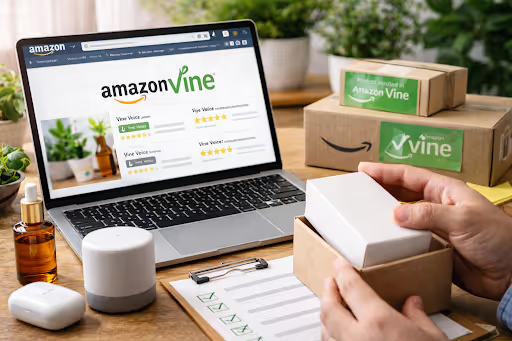
The Vine Program connects your products with Amazon's most trusted reviewers who provide honest, detailed feedback. This is particularly valuable for new product launches or listings that need a credibility boost through verified reviews.
- Navigate to Advertising → Vine in Seller Central
- Enroll parent ASINs with fewer than 30 reviews
- Standard enrollment costs 2 Vine credits ($200) or $75 for low-price items
- Receive up to 30 reviews within 90 days (typically 8-15)
- Only available for Brand Registry-enrolled sellers
Pro Tip: Prioritize Vine enrollment for your flagship products or new launches where early reviews have the biggest impact on sales velocity and search ranking.
Enable Automated Post-Purchase Emails

Manual requests work, but automation scales. Amazon's system can send these requests for you, ensuring you never miss a customer.
Setup:
- Go to Settings → Communication → Buyer-Seller Messaging.
- Enable "Request a Review" automation.
- The system sends requests 5-30 days after delivery.
Once you toggle this on, it runs in the background. It creates a steady trickle of reviews without you lifting a finger.
Optimize Product Listings for Higher Review Conversion
If your listing sets the wrong expectation, you will get bad reviews. If it sets the right expectation, you get happy customers.
A listing built for conversion is also built for positive feedback.
- Structure titles using the proven formula: Brand + Product Type – Primary Benefit | Supporting Features + What's Included, Size (Example: "OlifantDigital Bamboo Cutting Board – Extra Large & Juice Groove | Non-Slip Feet + Gift Box, 18x12 inches")
- Use high-quality images (minimum 1000x1000 pixels)
- Include A+ Content with detailed specifications
- Add comprehensive bullet points addressing common questions
- Work with an Amazon SEO agency to ensure your listing is technically optimized for both search visibility and conversion
When customers receive exactly what they expected based on your listing, they're more likely to leave positive feedback. Conversely, misleading information almost guarantees negative reviews.
A well-optimized listing prevents buyer disappointment and builds the foundation for consistent positive reviews.
Provide Exceptional Customer Service
Great service turns angry buyers into loyal fans. Often, a customer who had an issue but got it fixed quickly will leave a glowing review about the service itself.
- Reply fast: Aim for under 24 hours.
- Fix delivery issues: Don't wait for the negative review.
- Replace defectives: Send a new one immediately. Don't make them jump through hoops.
Many customers will update or remove negative reviews when you resolve their issues quickly and professionally. So, simply put, customer service can be one of your most powerful review management tools.
Include Compliant Product Inserts

A physical card in the box catches the customer at the exact moment they are holding your product.
The rules for inserts:
- Keep it neutral: "We hope you love it. Your feedback helps us."
- QR Codes: Link to your Amazon seller page, not a direct review link.
- No bribes: Never offer money, discounts, or free gifts in exchange for a review.
Read Amazon's policies carefully here. If you cross the line into "incentivized reviews," you risk your account.
Improve Product Quality and Packaging
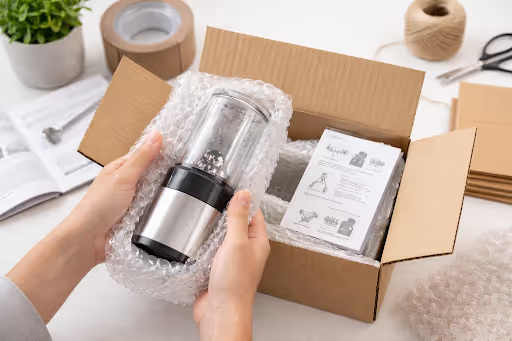
No marketing strategy can fix a bad product. If your item breaks in transit or feels cheap, your reviews will reflect that.
- Source higher-quality products to reduce defects
- Use protective packaging to prevent shipping damage
- Include clear instructions for products requiring assembly
- Test products thoroughly before listing
Investing in product quality pays dividends through organic positive reviews, reduced return rates, and higher customer lifetime value.
Time Your Review Requests Strategically
Timing truly matters so make sure to ask when the customer is happiest.
- Physical goods: Wait 5-7 days after delivery. Let them use it.
- Consumables: Ask after 2-3 days.
- Holiday rush: Be careful. Buyers are stressed and overwhelmed.
If you ask too early, they haven't used it. If you ask too late, they don't care anymore.
Monitor and Respond to All Reviews
Active review management shows customers you're engaged and care about feedback. Regular monitoring helps you catch issues early and demonstrate responsiveness to your entire customer base.
- Set up review monitoring through your Amazon account management agency or enable email notifications in Seller Central
- Respond to negative reviews professionally within 48 hours
- Thank customers for positive reviews occasionally (don't overdo it)
- Use feedback to improve products and listings
- Report policy-violating reviews through "Report abuse."
Your responses to reviews are visible to all potential customers, making them a powerful tool for building trust and showcasing your commitment to customer satisfaction.
Implementing these strategies consistently will help you build review momentum and establish lasting credibility on Amazon's marketplace.
Review Count Benchmarks: Setting Realistic Goals by Product Category
Understanding how many reviews you need isn't just about hitting arbitrary numbers; it's about reaching the critical thresholds that influence buyer behavior and Amazon's algorithm.
Different product categories have vastly different expectations, and knowing these benchmarks helps you set achievable goals and measure your progress effectively.
The Critical Mass Sweet Spot
For most products, 15-30 reviews is the tipping point.
- Buyers see the product as "tested."
- Conversion rates jump from ~5% (1 review) to ~14% (20 reviews).
- Amazon starts giving you better search visibility.
More reviews lead to better conversion. Better conversion leads to more sales. More sales lead to more reviews. It is a flywheel.
Data shows that products with just 1 review convert at approximately 5%, while those with 10,000+ reviews convert at 19%. However, the most dramatic conversion improvement happens between 1 and 20 reviews, where rates jump from 5% to roughly 14%.
Review Benchmarks by Product Category
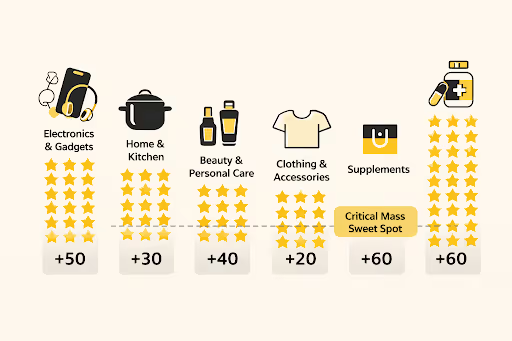
Different categories require different review counts to be competitive. Here's what you should target:
- Electronics & Gadgets (50-100+): Buyers research these heavily. They need lots of proof before spending money.
- Home & Kitchen (30-75): A crowded market. You need volume to stand out.
- Beauty & Personal Care (40-80): Shoppers want to know about skin reactions and specific results.
- Clothing (20-50): Buyers look for comments on fit and sizing.
- Books (10-25): Quality of the review matters more than the count.
- Supplements (60-100+): High trust barrier. People are putting this in their bodies.
New Product Launch Timeline Expectations
Setting realistic timelines prevents frustration and helps you stay committed to your review strategy. Here's what to expect:
- First 10 reviews: 30-60 days (using Vine and consistent review requests).
- First 50 reviews: 3-6 months.
- First 100 reviews: 6-12 months.
Amazon prefers a steady drip of reviews over a sudden spike. Spikes look suspicious. Consistency looks real.
How to Research Competitor Review Counts
Understanding your competitive landscape helps you set informed targets. Navigate to your product category on Amazon and analyze the top 10-20 listings for keywords you're targeting:
- Note the average review count among top-ranking products
- Identify the minimum review count needed to appear on page one
- Track the review velocity by checking how many new reviews competitors receive monthly
- Examine rating distribution (the ratio of 5-star to 1-star reviews)
Use this competitive intelligence to establish your baseline goal. If top competitors average 150 reviews, targeting 100+ reviews becomes your medium-term objective to remain competitive.
When Diminishing Returns Set In
Eventually, quality matters more than quantity.
Once you hit 200-300 reviews with a 4.3+ star rating, adding more reviews doesn't drastically change conversion. At that stage, your focus shifts:
- Maintain the rating.
- Manage the negatives.
- Use the feedback to improve the product.
Exceptions: In hyper-competitive niches (like supplements), you might need 500+ to stay alive. But generally, a 4.8-star product with 250 reviews beats a 4.2-star product with 1,000 reviews.
Using Reviews As A Competitive Advantage, Not A Vanity Metric
Reviews are a performance signal.
The winners on Amazon focus on velocity, accurate listings, and a great product. They use approved methods to request feedback.
Apply these tactics daily. Track your numbers against the benchmarks. Respond to your customers. That is how you turn a listing into an asset.
.webp)
Alex is the founder and CEO of Olifant Digital, where his team manages over $100M in annual Amazon client revenue across 50+ brands, and he runs a 7-figure Amazon brand of his own. That operator background shapes how the agency works: every tactic is tested with his own money before it reaches a client account. He oversees PPC methodology, creative, and conversion rate across all client accounts to make sure Olifant Digital scales brands profitably.


.png)
Mike reviews every Amazon article on this blog for strategic and technical accuracy before it publishes. As Director of Amazon Growth at Olifant Digital, he sets marketing strategy across client accounts and personally audits PPC at every stage of growth. He brings 8 years of daily Amazon operations across 7 and 8-figure brands including Beauty by Earth, Ekster, and Bullstrap, the kind of hands-on depth most agency directors delegate away.